WhatsApp vs. Telegram: Key Differences, Pros & Cons, and Which One You Should Choose
“Two apps. Billions of users. One deceptively hard choice.”
If you’ve ever stared at your phone wondering whether WhatsApp or Telegram is the better messaging app, you’re not alone. Both dominate conversations about privacy, features, and everyday communication, yet they’re built on very different philosophies.
In this guide, you’ll get a clear, no-nonsense comparison of WhatsApp vs. Telegram so you can decide which app actually fits your life. We’ll break down security, features, groups, business tools, and real-world use cases, without tech jargon overload. This article helps you:
- Understand what really separates WhatsApp and Telegram
- Choose the app that matches your priorities (privacy, features, or simplicity)
- Avoid common misconceptions about encryption and data sharing
- Make a confident decision backed by real data and official sources.
WhatsApp vs. Telegram: At a Glance
At first glance, WhatsApp and Telegram look similar: both are free messaging apps that support text, calls, photos, videos, and group chats. But under the hood, they take very different approaches to privacy, storage, and scale.
Quick Comparison Table
| Feature | Telegram | |
| Monthly Active Users | 2.5B+ | 900M+ |
| Default Encryption | End-to-end (all chats) | Cloud encryption |
| End-to-End Encryption | Always on | Secret Chats only |
| File Sharing Limit | ~2GB | Up to 2–4GB |
| Group Size Limit | ~1,024 users | Up to 200,000 |
| Cloud Storage | Limited | Unlimited cloud chats |
| Multi-Device Support | Yes (linked) | Yes (independent) |
| Business Tools | WhatsApp Business & API | Bots & channels |
| Customization | Minimal | Extensive |
Best for everyday communication: WhatsApp
Best for power users and communities: Telegram
WhatsApp prioritizes simplicity and universal reach, while Telegram prioritizes flexibility and scale.
Security & Privacy: Which App Protects You Better?
The issue of privacy is one of the top searched inquiries when it comes to the comparison between WhatsApp vs. Telegram, and for good reason. It turns out the two messaging applications treat the issue of encryption in diametrically opposite manners.
For instance, WhatsApp uses end-to-end encryption for all personal messages and calls which means that the messages and calls are only accessible to the recipient of the messages and the sender, not to WhatsApp, Meta, and even third-party organizations. This form of encryption is courtesy of the esteemed Signal Protocol.
Whereas Telegram uses cloud-based end-to-end encryption for regular chats, which enables instant sync across multiple devices and unlimited storage. End-to-end encryption is available only for “secret chats” that must be enabled manually and are usable only on a single device.
Privacy Strengths Compared
WhatsApp privacy advantages:
- End-to-end encryption turned on automatically
- Strong protection for everyday conversations
- Encrypted backups (optional)
Telegram privacy advantages:
- Secret Chats with self-destruct timers
- Username-based messaging (phone number optional)
- Minimal data collection compared to Meta ecosystem apps
The trade-off:
WhatsApp offers stronger default security, while Telegram offers more control if you’re willing to configure settings manually. For most everyday users, WhatsApp’s “secure by default” approach is easier and safer.
Features & Everyday Messaging Experience
When it comes to daily use, both apps handle basics wellو but the experience can feel very different depending on how much control you want.
Messaging, Media & File Sharing
Both apps support text messages, voice notes, emojis, stickers, GIFs, photos, and videos. The real difference shows up with files and storage.
Telegram allows users to send very large files (2–4GB) of almost any type and stores them in the cloud indefinitely. This makes it popular for sharing documents, videos, and large media collections.
WhatsApp limits file sizes and relies more on your phone’s local storage, which keeps things simple but less flexible.
Voice & Video Calling
WhatsApp excels at reliable voice and video calls. Group calls are easy to start, stable, and widely used by families and friends.
Telegram also offers high-quality calls and massive group video broadcasts, but most casual users still prefer WhatsApp’s simplicity for face-to-face communication.
Customization, Bots & Power Features
This is where Telegram pulls far ahead. Telegram offers:
- Custom themes and interfaces
- Powerful bots for automation
- Public channels and advanced admin tools
WhatsApp keeps customization minimal, which many users actually prefer.
Top 5 Feature Differences That Matter Daily
- Telegram supports much larger files
- WhatsApp is simpler and more intuitive
- Telegram offers advanced automation
- WhatsApp prioritizes stability
- Telegram feels more “tech-friendly”
Groups, Communities & Channels
If groups are a big part of your communication, this section is really important.
WhatsApp groups are best used for small groups like families, friends, schools, and small teams. Communities is a feature provided by WhatsApp to keep multiple groups together under one title or heading; groups cannot have a very large number.
Telegram is designed to be scalable with a maximum of 200,000 members per group. Furthermore, there are channels which enable one-way broadcasting to an endless number of subscribers.
Group Use Cases
WhatsApp groups are best for:
- Family chats
- Neighborhood groups
- Small teams
- Private conversations
Telegram groups and channels are best for:
- Large communities
- Public discussions
- News updates
- Content creators
If you manage or participate in large communities, Telegram is clearly the better tool.
Business & Professional Communication Tools
No longer are messaging apps just for casual conversation; they are a vital part for customer relations, marketing, internal communication, and automation. Though both WhatsApp and Telegram are business-friendly for particular purposes, they are developed for very different needs for professionals.
WhatsApp for Business: Customer-Focused and Trust-Driven

WhatsApp’s system is structured around direct one-to-one communication with customers. WhatsApp Business َApp is a free application that allows small businesses to:
- Add a profile
- Have business hour indicators
- Send automated greeting messages
- Respond to customers immediately by using quick reply messages. This is especially useful for local businesses and service providers.
For larger companies, the WhatsApp Business API enables advanced use cases such as:
- Customer support at scale
- Order confirmation and shipping updates
- Appointment reminders
- Two-factor authentication (2FA) and login verification
As WhatsApp is already very popular within the U.S. and globally, this means that as a business, you have high open rates and trust with your consumers, where your messages feel personalized rather than promotional in nature.
WhatsApp Business pricing:
- WhatsApp Business App: Free
- WhatsApp Business API: Usage-based pricing (cost per conversation, varies by region and provider)
Telegram for Business: Automation, Scale & Broadcasting
Telegram takes a very different approach. Instead of focusing on private customer chats, it excels at broadcasting, automation, and community-driven communication.
Telegram allows businesses to create:
- Public channels for announcements, promotions, or content distribution
- Large groups for communities, events, or customer engagement
- Bots that automate tasks such as customer support, surveys, content delivery, and payments
This makes Telegram especially attractive for:
- Startups and tech companies
- Content creators and educators
- Crypto, finance, and open-source communities
- Brands managing very large audiences
Telegram messages are stored in the cloud, allowing teams to access conversations instantly across multiple devices without relying on a single phone.
Telegram Premium Pricing & Features
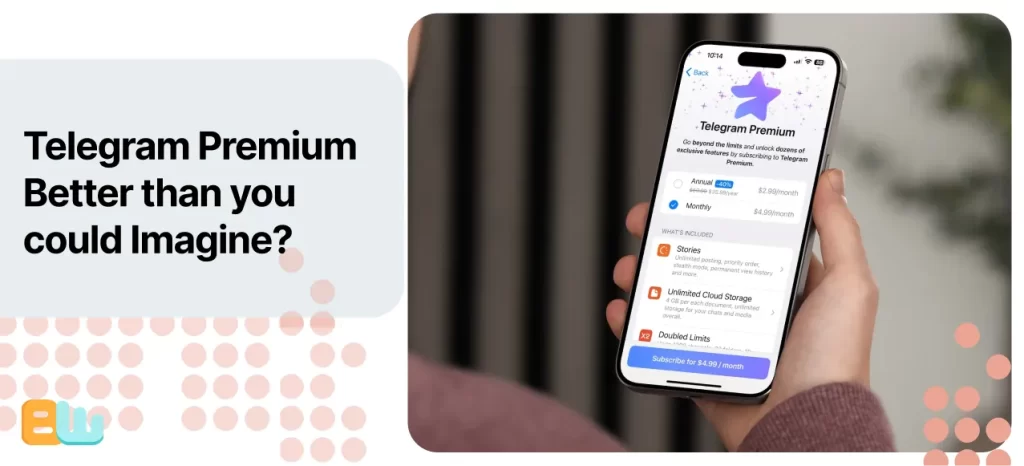
Telegram offers an optional Telegram Premium subscription designed for power users and professionals who want enhanced capabilities.
Telegram Premium pricing:
- Approximately $4.99–$6.99 per month (varies by region and platform)
Telegram Premium benefits include:
- Larger file uploads (up to 4GB per file)
- Faster download speeds
- Voice-to-text message conversion
- Advanced chat management tools
- Exclusive stickers and reactions
- No sponsored messages
While Premium isn’t required for basic business use, it’s valuable for professionals who regularly share large files, manage multiple chats, or rely on Telegram for daily work.
Business Use Cases Compared (Quick Breakdown)
WhatsApp is best for:
- Customer service and support
- Order updates and confirmations
- Appointment scheduling
- Secure login verification
- Small and medium businesses
Telegram is best for:
- Large-scale announcements
- Community building and engagement
- Automation through bots
- Content distribution
- Tech-savvy teams and creators
Bottom Line for Professionals
If your business relies on:
personal and trusted one-to-one communication → WhatsApp Business is the better choice.
If your business needs:
flexibility, scalability, and the power of broadcast messages → Telegram with the optional Telegram Premium is hard to beat.
In fact, many modern businesses use both platforms simultaneously, with WhatsApp for customer service and Telegram for marketing, community, and other automation needs.
Pros & Cons: WhatsApp vs. Telegram
WhatsApp Pros
- Massive global user base
- End-to-end encryption by default
- Simple, user-friendly interface
- Strong business tools
WhatsApp Cons
- Limited customization
- Smaller group size limits
- Tied to Meta ecosystem
Telegram Pros
- Huge group and channel capacity
- Advanced features and bots
- Cloud-based storage
- Highly customizable
Telegram Cons
- End-to-end encryption not default
- More complex for casual users
- Smaller user base in the U.S.
Which One Should You Choose?
The right choice depends entirely on how you communicate.
- Choose WhatsApp if you want simplicity, security by default, and easy communication with friends and family.
- Choose Telegram if you want powerful features, large communities, file sharing, and customization.
- Use both if you value privacy and flexibility, many people do.
There’s no universal winner, just the app that fits your habits best.
Conclusion
WhatsApp and Telegram are both fantastic messaging apps, each tailored for different kinds of users. WhatsApp boasts ease in everyday communication, security, and universal reach. Telegram shines in advanced features, mega groups, and customization.
If ease, reliability, and privacy without effort are your top priorities, then WhatsApp is hard to beat. If you want control, scale, and flexibility, Telegram might be the better fit for you. Just try both, see where your contacts are, and choose what feels right. Your messages should work for you, not the other way around.
Frequently Asked Questions
What are the disadvantages of Telegram? Why do people prefer Telegram?
Telegram’s main disadvantages are that end-to-end encryption is not enabled by default and the app can be complex for casual users. Regular chats are cloud-encrypted, not end-to-end encrypted, unless users manually start Secret Chats.
People prefer Telegram because it offers:
- Very large groups and public channels
- Powerful bots and automation
- Cloud-based chats across devices
- Extensive customization options
Is using Telegram a red flag?
No, using Telegram is not a red flag because it is a legitimate messaging platform that is also commonly used by businesses, community groups, and individuals.
Telegram’s reputation is not due to the app itself but to the light moderation of the public groups. To most people, Telegram is nothing more than an alternative communication platform.
Which is more secure: WhatsApp, Telegram, or Signal?
Signal is the most secure, followed by WhatsApp, then Telegram. Signal stands out with end-to-end encryption as a default policy with minimal data collection.
While WhatsApp also uses end-to-end encryption by default, it collects more metadata. Telegram uses end-to-end encryption only for the Secret Chat feature, which reduces its security by default.
How risky is Telegram?
Telegram is not inherently a risky application but requires more awareness on the users’ side. The two main risks include the presumption that chats are entirely encrypted and the involvement of unmoderated groups.
When used in the right way and combined with carefully adjusted settings to ensure privacy, Telegram can be considered safe to use.
What should you avoid on Telegram?
To stay safe on Telegram, avoid:
- Sharing personal or financial data in non-Secret Chats
- Clicking links from unknown users or bots
- Joining suspicious or poorly moderated public groups
