Image Search Techniques: How Marketers Move Fast

That one image you just saw online might have a whole hidden story, you just need the right tools to find it.
If you’re a marketer trying to understand visual trends, a beginner trying to identify a mysterious photo, or an SEO professional tracking brand usage, image search techniques can completely change how you navigate the internet. They can also make your life considerably easier.
In this guide, you’ll learn:
- How image search actually works
- The best tools to use
- Strategies professionals use to find anything from products to people to original sources in seconds.
What Are Image Search Techniques?
Image search techniques refer to methods where you use a picture to find information online instead of typing words. You just show the computer a photo, and it helps you find out more about it.
It’s like asking the internet, ‘What is this picture?’ You show it a photo, and it helps you find where it came from or what it shows.
This includes:
- Reverse image search
- AI-powered visual recognition
- Metadata (EXIF data) analysis
- Content-based image retrieval (CBIR)
- Semantic image matching
Modern search engines don’t just “see” images, they analyze patterns, shapes, colors, objects, and even context using machine learning.
Why it matters today:
- Images spread faster than text online
- Visual misinformation is increasing
- Brands reuse images without attribution
- E-commerce depends heavily on visual discovery
Key takeaway:
- Image search = searching with visuals instead of text
- Uses AI + indexing systems
- Critical for SEO, marketing, journalism, and security
- Helps verify authenticity and track sources
How Reverse Image Search Works (Step-by-Step)

The most popular technique is reverse image search, which is when instead of typing your query, you either upload an image or paste a URL and the search engine finds results that are visually similar.
y=f(x)y = f(x)y=f(x)
(Think of it like this: the image becomes the “input,” and the system predicts matching outputs across the web.)
Search engines break images into:
- Pixels and patterns
- Shapes and edges
- Color distribution
- Object recognition (AI models)
Then they compare them against billions of indexed images.
Step-by-step process:
- Upload or paste image URL
- System extracts visual features
- AI matches patterns across indexed databases
- Results show identical or similar images
- Source websites are ranked by relevance
Best use cases:
- Finding original image source
- Detecting fake or edited images
- Identifying unknown objects or places
- Tracking image reuse online
Google Lens = best for everyday recognition | TinEye = best for historical tracking
Best Image Search Tools in 2026
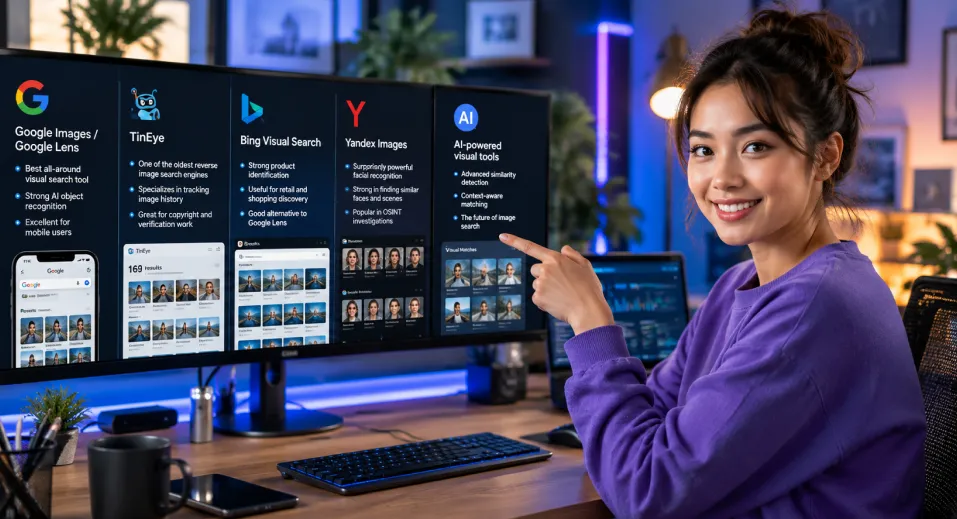
Not all image search engines work the same way. Some are optimized for shopping, others for forensic tracking or SEO research.
Major tools include:
1. Google Images / Google Lens
- Best all-around visual search tool
- Strong AI object recognition
- Excellent for mobile users
2. TinEye
- One of the oldest reverse image search engines
- Specializes in tracking image history
- Great for copyright and verification work
3. Bing Visual Search
- Strong product identification
- Useful for retail and shopping discovery
- Good alternative to Google Lens
4. Yandex Images
- Surprisingly powerful facial recognition
- Strong in finding similar faces and scenes
- Popular in OSINT investigations
5. AI-powered visual tools (emerging category)
- Advanced similarity detection
- Context-aware matching
- Used in marketing analytics and cybersecurity
| Tool | Best Use Case | Strengths | Weaknesses | SEO/Marketing Value |
| Google Lens | General search | Fast, accurate AI | Limited historical tracking | High |
| TinEye | Image tracking history | Deep archive search | Smaller index | High |
| Bing Visual Search | Product discovery | Strong retail integration | Less global coverage | Medium |
| Yandex | Facial matching | Very powerful recognition | Privacy concerns | Medium |
| AI Tools | Marketing + OSINT | Advanced similarity detection | Still evolving | High |
When to use each tool:
- Use Google Lens for everyday searches
- Use TinEye for copyright or origin tracing
- Use Bing for shopping/product discovery
- Use Yandex for deep visual similarity
- Use AI tools for marketing analytics
Image Search Techniques for SEO & Marketing
Image search is not just another simple tool for marketers, it shows them exactly how content spreads, ranks, and performs all over the world wide web. Since search engines have become visual first, especially on mobile, utilizing image search technique directly affects organic traffic and content strategy
Modern platforms like Google don’t just index text anymore, they actively evaluate images for relevance, authority, and engagement signals, making visual SEO a critical ranking factor in Google Images and even standard SERPs.
How Marketers Actually Use Image Search
In real-world SEO workflows, reverse image search is used strategically to uncover opportunities and risks that are invisible in traditional keyword research.
Core marketing applications include:
- Tracking where brand images appear across the web
- Identifying competitor content distribution strategies
- Finding content theft or unauthorized image use
- Discovering backlink opportunities from image embedding
- Analyzing visual trends in niche industries
Real SEO Workflow (Step-by-Step Use Case)
Professionals typically follow a structured process when using image search for SEO insights:
- Upload a brand or product image into reverse image search tools
- Identify websites using or republishing the image
- Analyze domain authority of those sources
- Check if attribution or backlinks are included
- Reach out for credit or link reclamation opportunities
- Identify content gaps where competitors rank visually but you do not
This workflow turns image search into a link-building and competitive intelligence system, not just a discovery tool.
Benefits of Image Search in SEO Strategy
Key advantages include:
- Increases visibility in Google Images, a major traffic source for e-commerce
- Helps detect and prevent content theft or unauthorized reuse
- Improves backlink acquisition through image attribution tracking
- Enhances keyword targeting by analyzing competitor visuals
- Supports product discovery through visual intent searches
Marketing Use Cases
| Use Case | Tools Used | Outcome / Value | Difficulty Level |
| SEO Monitoring (brand image tracking) | Google Lens, TinEye, Bing Visual Search | Identifies where brand or product images appear online, helps protect brand reputation | Beginner |
| Competitor Analysis (visual strategy research) | Google Images, Yandex Images, AI visual tools | Reveals competitor content distribution, design patterns, and visual positioning strategies | Intermediate |
| Brand Protection (content theft detection) | TinEye, Google Reverse Image Search | Detects unauthorized image use and enables copyright enforcement or credit reclamation | Intermediate |
| Product Research (e-commerce discovery) | Google Lens, Bing Visual Search | Finds similar or identical products online, improves product catalog optimization | Beginner |
| Backlink Building (image attribution tracking) | Google Reverse Image Search, SEO tools | Finds websites using your images to request backlinks or credit, improving domain authority | Advanced |
| Trend Analysis (visual content trends) | AI image tools, Google Images | Identifies trending visual styles, formats, and content themes in a niche | Advanced |
Key Insight for SEO Professionals
Image search in SEO = discovery engine for visual content performance
Traditional SEO = discovery engine for text-based content
This distinction is important because visual content often circulates independently of its original page, meaning marketers can lose attribution or gain unexpected exposure, without ever tracking it.
Advanced Image Search Techniques (OSINT Level)
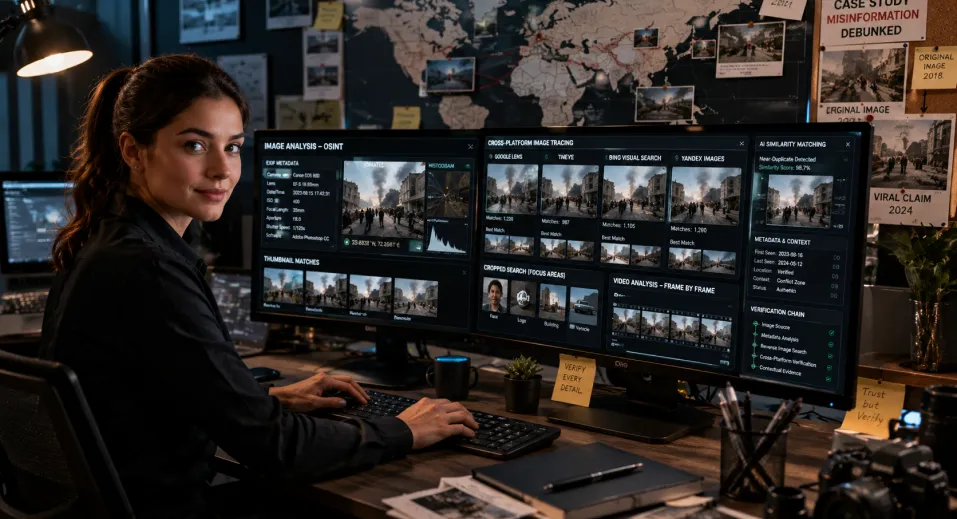
This is when professionals, journalists, sleuths, cybersecurity experts, and OSINT analysts go above and beyond the basics of reverse image search to examine images as forensic evidence rather than just documents. OSINT image analysis is the process of analyzing the tool used along with logic to verify and find the truth behind the visual.
At its core, OSINT image search is not about finding one match, it’s about building a chain of verification across multiple signals.
EXIF Metadata Analysis
Every photo taken on a device can contain hidden metadata known as EXIF data. This may include:
- Camera model and settings
- Date and time the image was captured
- GPS coordinates (if location services were enabled)
- Software used to edit the image
This data is usually used to verify authenticity or to find traces of manipulation. It’s good to know that many platforms (like social media sites) remove EXIF data automatically to protect privacy and for security reasons.
Cross-Platform Image Tracing
Instead of relying on a single engine, OSINT professionals run the same image through multiple systems:
- Google Lens
- TinEye
- Bing Visual Search
- Yandex Images
Each platform indexes different parts of the web, so combining results increases accuracy and reduces blind spots.
Cropping for Partial Searches
Sometimes the full image is too complex. Analysts crop specific elements such as:
- Faces
- Logos
- Background landmarks
- Clothing or objects
This improves matching precision and helps isolate the most searchable feature.
Frame-by-Frame Video Analysis
When images come from videos, investigators extract individual frames and run them through reverse search tools. This technique is especially useful in verifying viral clips or news footage.
AI Similarity Matching
Modern OSINT workflows also use AI tools that detect:
- Edited or compressed versions of images
- Near-duplicates across platforms
- Contextually similar visuals even when altered
Core OSINT Techniques
- Extract metadata before publishing or analysis
- Use multiple reverse image engines simultaneously
- Crop images to isolate key visual features
- Cross-check results across different platforms
- Verify findings with contextual or timestamp evidence
Case Study Example to Understand Better
Journalists frequently use OSINT image search techniques to debunk misinformation.The truth behind many viral images has shown that the “breaking news” photo was actually from years back when the image was captured in a completely different location or context than what the story said. This is done through metadata and reverse image search.
Common Mistakes in Image Search
Even with powerful tools, users can often make simple mistakes that reduce accuracy.
Mistakes to avoid:
- Uploading low-resolution images
- Not cropping out irrelevant background
- Using only one search engine
- Ignoring metadata information
- Assuming first result is always correct
These mistakes can lead to incomplete or misleading results.
Conclusion
Image search techniques have revolutionized the way that we consume information in the online world. Manual processes have become automated by the use of artificial intelligence technology within seconds.
From identifying unknown objects to verifying news, from boosting SEO performance to tracking brand usage, image search has become a core digital skill for the modern internet.
When our world revolves around visuals, image tracing technology gives us the upper hand.
Regardless of whether you are a beginner who’s curious about image search or a seasoned professional working on your data, understanding image search techniques can help you in various ways.
